
Getting started with Wintomic means creating an account, verifying your identity, and securing your login credentials – a process that typically takes a few minutes but requires specific documents and information.
This guide walks you through each step of registration, explains what the platform asks for during verification, and shows you how to recover access if you run into login issues. Whether you're setting up your first account or troubleshooting a locked session, you'll find the practical details you need to manage your Wintomic access smoothly.
Account Registration Requirements
Before you can open an account at Wintomic, you need to meet several basic eligibility requirements set by the platform's Anjouan Gaming licence (ALSI-202508040-FI2). The most important is age: you must be at least 18 years old to register. The site will ask for your date of birth during sign-up and may request identity documents later to verify it.
Eligibility Criteria
To create a Wintomic account, you must be a legal adult in your jurisdiction – at minimum 18 years old – and located in a region where the platform is permitted to operate under its Anjouan licence.
Malaysian residents should be aware that accessing offshore gambling sites remains an offence under the Common Gaming Houses Act 1953, regardless of the operator's licence elsewhere. MCMC continues to block gambling domains, and penalties for players can reach RM5,000 or six months' imprisonment. The responsibility to comply with your local law rests with you.
What You'll Need to Provide
Registration asks for standard personal details: your full legal name, a valid email address, a mobile phone number, your date of birth, and a secure password. Make sure the name you enter matches any government-issued ID you might submit for verification later – discrepancies can delay withdrawals or account approval.
The email and phone number you provide will be used for account notifications and password recovery, so choose ones you check regularly. Create your account once you've gathered these details and confirmed you meet the eligibility criteria above.
Step-by-Step Registration Process
Creating an account at Wintomic follows a straightforward flow that balances ease of use with regulatory compliance. The platform guides you through each field without requiring downloads or lengthy forms, though you should expect to complete email verification before gaining full access.
If registration fails, the most common issues are mismatched email addresses, passwords that don't meet complexity requirements, or date-of-birth entries indicating under-18 status. Double-check each field before submitting, and ensure you have access to the email inbox you're registering with – that's where your activation link will arrive.
Here's what the process looks like from start to finish:
Find the registration button in the top-right corner of the homepage (usually labeled "Sign Up" or "Register"). Click it to open the account creation form, which appears either as an overlay or on a dedicated page.
Enter your details in the required fields: email address, password (at least eight characters mixing letters and numbers), preferred currency, and date of birth. Some fields may also ask for a mobile number. Double-check your email carefully – you'll need access to that inbox for verification.
Accept the terms by ticking the mandatory checkboxes confirming you're at least 18 years old and agree to the site's terms of service and privacy policy. The form won't proceed without these.
Submit and verify by clicking the final button. The platform will send a confirmation message to your email (and phone, if you provided one). Click the verification link or enter the code to activate your account.
Once verification completes, you can log in and make your first deposit. Keep in mind that full account verification – uploading ID or proof of address – may be required later before you can withdraw, depending on transaction size and regulatory checks.
Sign-up Options on the Wintomic Form
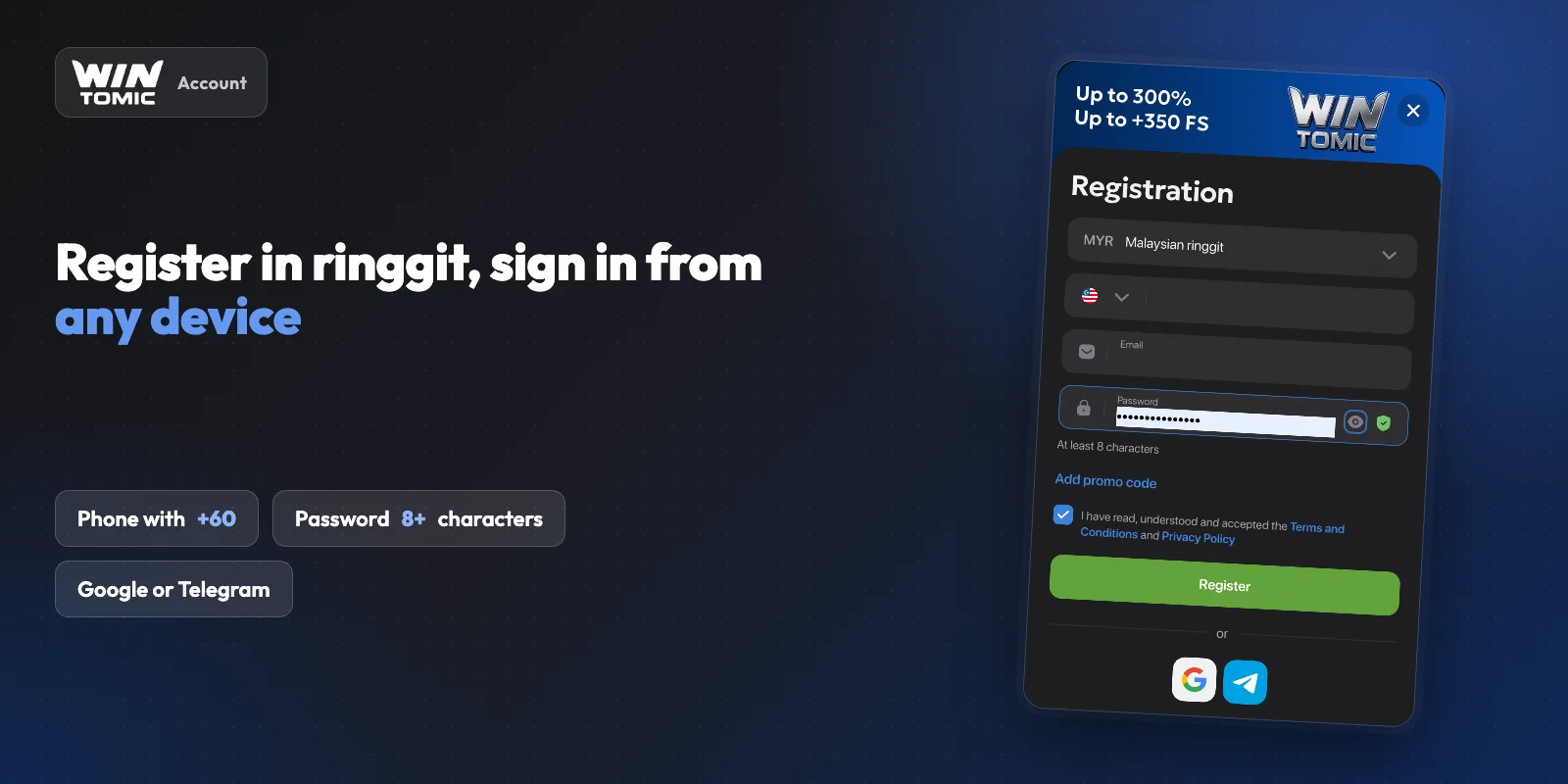
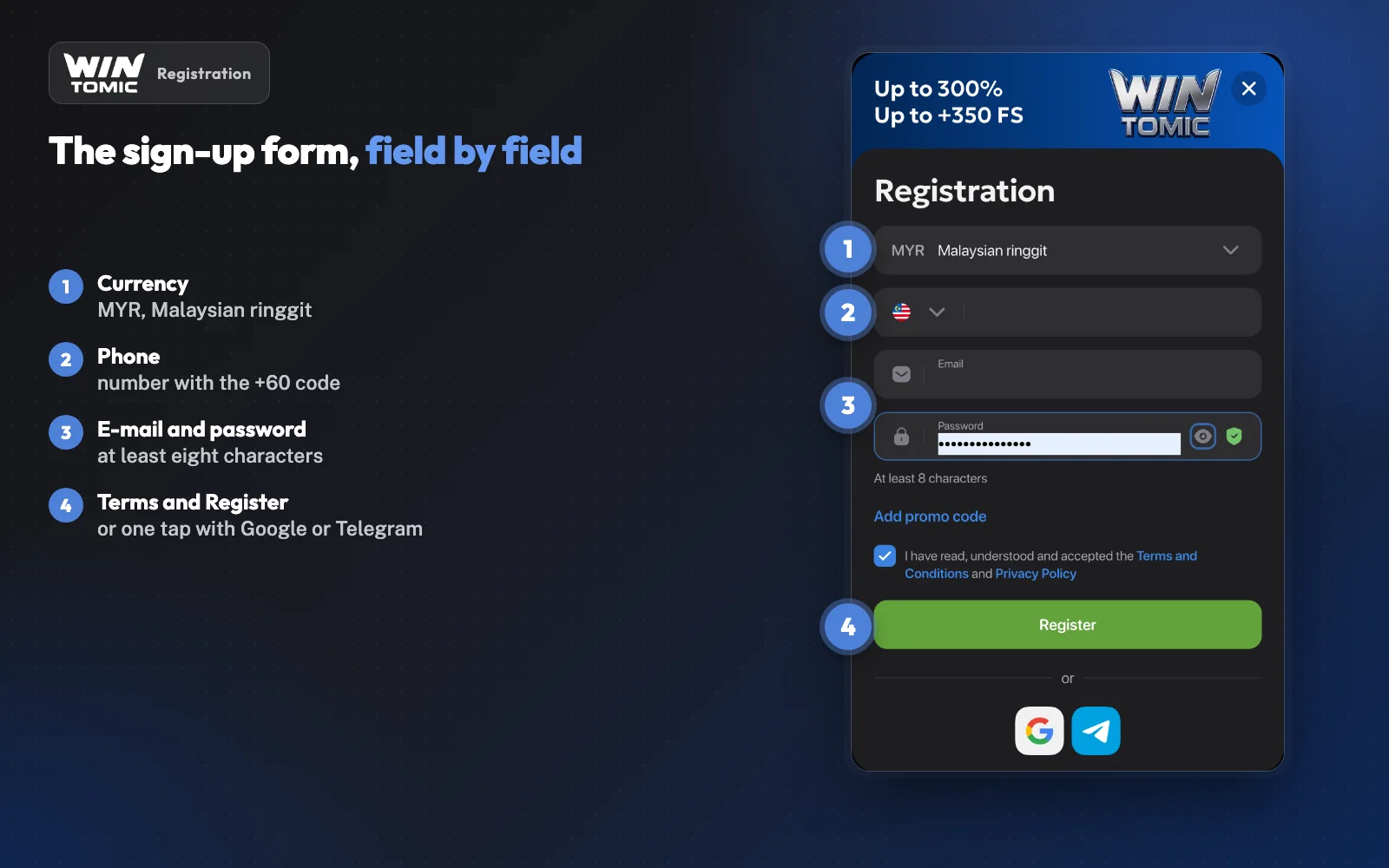
The form opens with the account currency, where Malaysian players pick MYR. It then asks for a phone number with the +60 code, an e-mail address and a password of at least eight characters, with an optional promo code field. Ticking the box for the Terms and Privacy Policy completes it. You can also skip the form and sign up with a Google or Telegram account.
Free Spins for Verification
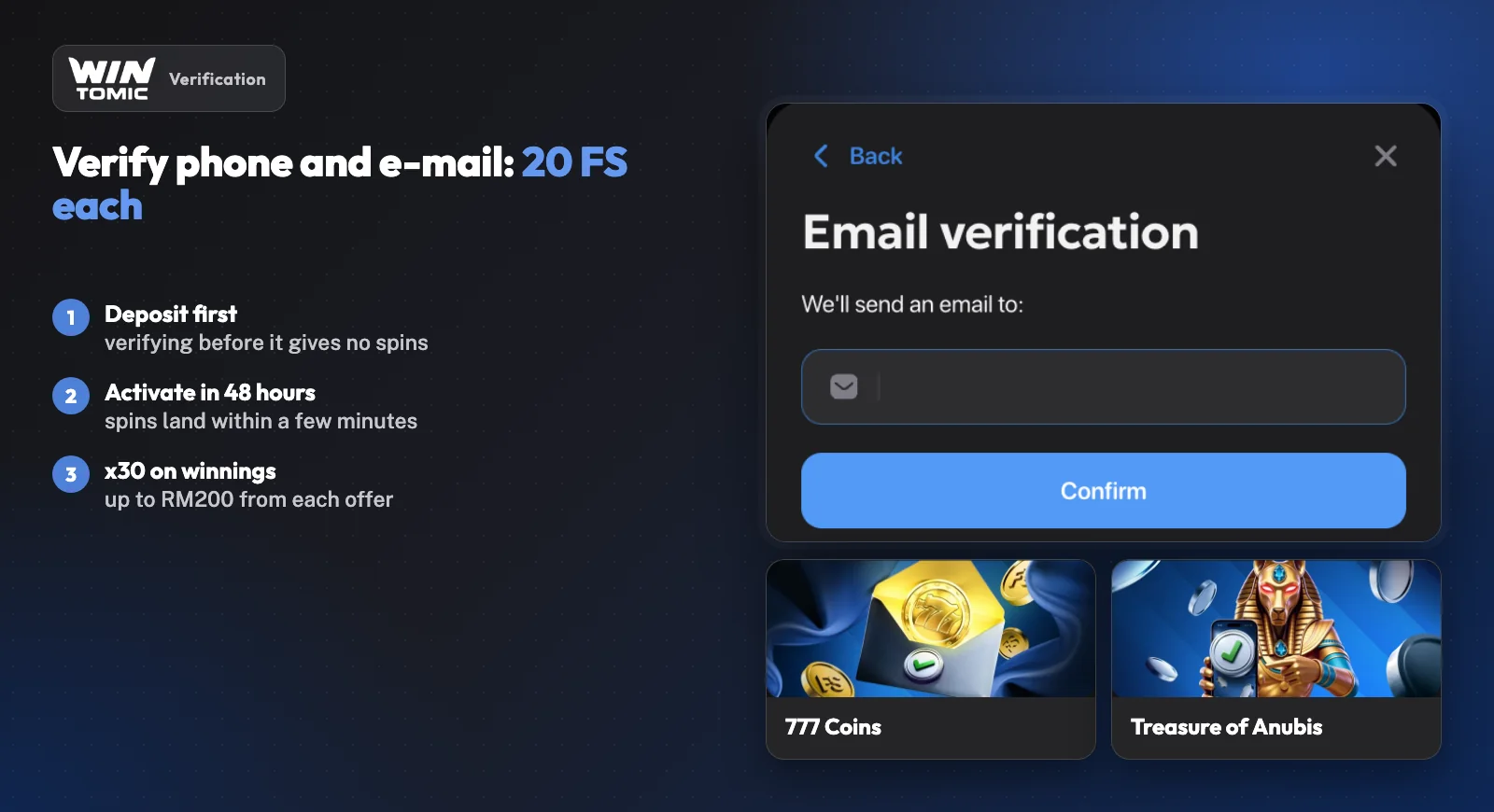
Verifying the phone and the e-mail later pays 20 free spins each: Treasure of Anubis for the phone and 777 Coins for the e-mail. Both need a deposit first, since verifying before the first deposit gives no spins.
The spins land automatically within a few minutes and must be activated within 48 hours. Winnings from them carry x30 wagering within 48 hours, capped at RM200 from each offer. Phone verification runs from profile settings with an SMS code; the e-mail check works through a link sent to your inbox.
Identity Verification Explained
Wintomic requires all players to complete identity verification before processing withdrawals. This requirement stems from the platform's regulatory obligations under its Anjouan Gaming licence, which mandates Know Your Customer (KYC) procedures to prevent fraud and ensure responsible gaming practices.
What Documents You'll Need
The verification process accepts two main types of documentation. First, a government-issued photo ID – typically a passport, national identity card, or driver's licence – confirms your identity and matches the name on your account. Second, proof of address validates your residential details. A recent utility bill, bank statement, or government correspondence showing your name and current address will satisfy this requirement. Documents must be clearly legible, with all four corners visible and no information obscured.
How to Submit Your Verification
Upload your documents directly through your Wintomic account dashboard. Navigate to the account settings or verification section, where you'll find prompts to submit each required document type. The platform accepts common image formats including JPG and PNG, and you can photograph documents with your phone as long as the text remains sharp and readable.
Timing: While the site doesn't publish specific processing timelines, starting verification early – ideally soon after registration rather than waiting until your first withdrawal – helps avoid delays when you're ready to cash out.
Once submitted, the compliance team reviews your documents to confirm they meet licensing standards. You'll receive notification through your account when verification is complete. Note that withdrawals remain locked until the review finishes, so players planning to cash out should factor this step into their timing.
Logging In to Your Account
Once you've completed registration, accessing your Wintomic account is straightforward. The login button sits prominently in the top-right corner of the homepage – a single click opens the credential form where you'll enter the email address or username you registered with, along with your password. After submitting, the platform verifies your details and redirects you to the main lobby, where your account balance, available games, and any active promotions appear immediately.
A "remember me" checkbox appears in the login form, keeping you signed in across browser sessions on the same device. Ticking this option means you won't need to re-enter credentials each time you return, though it's best reserved for personal devices rather than shared or public computers. Leave the box unchecked if you're using a public terminal, and Wintomic will prompt you to log in again when you close and reopen your browser.
Automatic Logout and Login Errors
After a period of inactivity – typically around 15 to 30 minutes, though the exact window isn't published – the platform logs you out automatically. You'll see a notification prompting you to log back in if your session expires while you're mid-browse. This feature reduces the risk of unauthorized access if you forget to sign out manually.
Should you encounter an error message during login – wrong password, unrecognized email, or account-locked notification – double-check your credentials first, then use the password-reset link below the form if needed. Reach out through the contact page if the issue persists or if you suspect your account has been compromised.
Password Security & Requirements
A strong password is your first line of defense against unauthorized access to your Wintomic account. The platform protects your balance, personal details, and transaction history, so weak credentials can expose you to account takeover, identity theft, or unauthorized withdrawals.
Building a secure password means following these concrete rules:
- Use at least 12 characters – longer passwords resist brute-force attacks more effectively.
- Mix upper/lowercase, numbers, symbols – combine character types to increase complexity.
- Avoid birthdays, pet names, sequential patterns – skip easily guessed information like "123456" or "qwerty".
- Never reuse passwords across sites – if one service suffers a breach, attackers often try those login pairs elsewhere.
- Consider a password manager – reputable tools generate and store unique credentials securely if you struggle to remember every account.
Update your password periodically, especially after logging in from a shared or public device. Never share your login details with anyone, including friends or family members who might mean well but inadvertently compromise your account. If you notice unfamiliar activity or receive a password-reset email you didn't request, change your password immediately and report the incident through the platform's contact form. Taking these precautions keeps your account secure and your funds protected.
Recovering a Forgotten Password
Locked out of your account happens – the password reset process gets you back in quickly. Start by clicking the "Forgot Password" or "Reset Password" link on the login screen. You'll be taken to a recovery page where you'll enter the email address you used when you registered. Make sure you type it exactly as it appears in your account – even a small typo will prevent the system from finding your profile.
When the Reset Email Arrives
Once you submit the form, check your inbox for the reset email. It usually arrives within a few minutes and contains a secure link that takes you to a page where you can create a new password. Choose something strong – a mix of letters, numbers, and symbols – then confirm it by typing it again. The system will verify the match and save your new credentials immediately.
If the reset email doesn't arrive, start with these steps:
- Check your spam or junk folder – automated emails from gaming sites sometimes get filtered there.
- Verify the email address – confirm you entered the same address you used during registration. Many issues trace back to users creating an account with one address and then trying to reset with another.
- Wait ten to fifteen minutes – delivery can occasionally be delayed by server load or email provider filters.
If you've confirmed the address is correct and the email still hasn't shown up after that window, reach out through the contact page for help. Support can verify which email is on file for your account and resend the reset link manually if needed. Keep your account details handy – your username or registered phone number – so they can locate your profile quickly.
Common Login Issues & Solutions
Before you contact support, it's worth running through the checklist below – most access hiccups resolve in under two minutes once you've pinpointed whether the issue lives in your typed input, your device's stored data, or the platform's automated safeguards.
| Issue | Cause | Solution |
|---|---|---|
| "Invalid credentials" | Typo, caps-lock | Use "Forgot password?" link |
| Account locked | Too many failed logins | Wait, or ask support |
| Blank / won't load | Stale cache or cookies | Clear cache, reload site |
| "Service restricted" | VPN or region flagged | Disable VPN, retry |
| Nothing works | Server or account issue | Contact support with details |
Most login hiccups resolve once you've identified the actual cause. If you've worked through this list and still can't get in, support can investigate account-specific blocks or back-end issues that won't show a clear error on your end – be ready to share which steps you've already taken so they can skip straight to diagnosing anything unusual on their side.
Account Limitations You Should Know
Wintomic enforces several account restrictions that apply from the moment you register. Understanding these rules helps avoid frustration and protects your access to the platform.
One Account Per Person
The platform permits only one account per individual. Creating multiple accounts – whether to claim bonuses twice, bypass limits, or for any other reason – violates the terms of service and typically results in permanent closure of all associated accounts. Winnings held in duplicate accounts are usually forfeited, and any pending withdrawals may be cancelled. This policy is standard across licensed operators and exists to prevent bonus abuse and maintain fair play.
Verification Before Withdrawal
You cannot withdraw funds until you complete identity verification. The site will accept deposits and let you play immediately after registration, but your first withdrawal request triggers a mandatory KYC check.
You'll need to upload government-issued ID, proof of address, and possibly payment method documentation. Processing can take anywhere from a few hours to several days, depending on document quality and current support workload. Plan accordingly – treat verification as a prerequisite to cashing out, not an optional step.
Regional Access Challenges
Malaysia's MCMC actively blocks offshore gambling sites, and Wintomic's domains fall under that policy. Even with a valid Anjouan licence, the platform operates outside Malaysian jurisdiction, which means ISP-level blocks can prevent login access without warning.
If you're blocked mid-session, clear your browser cache, switch to a different browser, or restart your device. If the block persists, you may need to contact your ISP or wait for the site to rotate to an alternative domain. Some players use VPNs to maintain access, though this can complicate verification later – the platform's geolocation checks may flag mismatched IP addresses during KYC, and you'll need to explain the discrepancy to support.
Before you register: Before registering, check whether the main domain loads cleanly from your network. If you're already seeing ISP warnings or connection errors, that pattern will likely continue. Under Malaysian law (Common Gaming Houses Act 1953 and the 2023 Court of Appeal ruling), accessing offshore gambling sites remains an offence regardless of the operator's foreign licence. Understand that account access isn't guaranteed in regions where offshore gambling faces active enforcement.
For questions about eligibility or technical access issues, reach out to support before depositing.
Keeping Your Account Secure
A strong password is only the first layer of protection. Staying vigilant about login hygiene, monitoring activity, and recognising threats will help you maintain control over your account.
- Session management: Log out whenever you finish a session on a shared or public device – staying signed in on someone else's computer or phone leaves your account exposed. Even on your own devices, logging out when you're done adds a useful barrier if the device is lost or stolen. If Wintomic offers two-factor authentication, enable it. This adds a second verification step (typically a code sent to your phone) whenever you log in, so even if someone has your password, they can't access the account without that second factor.
- Monitoring account activity: Check your account activity regularly; most platforms keep a record of recent logins, deposits, withdrawals, and changes to settings. If you notice an unfamiliar login location, an unexpected withdrawal request, or a setting you didn't change, contact support immediately. The sooner you flag suspicious activity, the easier it is to lock down the account and prevent further damage.
- Recognising phishing attempts: Be cautious with emails that ask you to log in by clicking a link, especially if they warn about urgent account issues or offer surprise bonuses. Phishing messages often mimic legitimate platform emails, but the link leads to a fake login page designed to steal your credentials. When in doubt, navigate to the site directly by typing the URL yourself rather than clicking through from an email. Check the address bar carefully before you enter your username and password – fake login pages sometimes use domain names that look almost right but aren't.
If you suspect unauthorised access at any point, contact support right away. Quick reporting gives the team the best chance to secure your account before any damage is done.
Frequently Asked Questions
How do I reset my Wintomic password if I forget it?
Use the "Forgot password?" link on the login page. Enter the email address associated with your account, and the platform will send you a password reset link. Follow the instructions in the email to create a new password. If the email doesn't arrive within a few minutes, check your spam folder or reach out through the contact page for assistance.
Can I register more than one Wintomic account?
No – the platform permits only one account per person. Creating multiple accounts violates the terms of service and can result in all associated accounts being suspended and any funds forfeited. If you've lost access to your original account, contact support to recover it rather than opening a new one.
What should I do if I can't log in to my account?
First, double-check that you're entering the correct email and password – passwords are case-sensitive. If you've forgotten your password, use the reset link on the login page. If your account has been locked due to failed login attempts or a security flag, contact support with your registered email address to resolve the issue.
How long does identity verification take?
Verification timelines vary depending on document quality and current queue volume. Most submissions are reviewed within 24 to 48 hours during business days, though complex cases or peak periods may extend the process. You'll receive an email once your documents have been approved or if additional information is required. To avoid delays, ensure all uploaded documents are clear, valid, and match the details on your account.